
Fixing "Filter Failure": Reclaiming Focus and Digital Wellbeing for Tech Workers

Builders, developers, and other tech workers often spend their lives surrounded by the digital. Whether it's by writing code, mapping architectures, or automating redundant workflows, they help others benefit from technology. But sometimes, in the midst of helping everyone else, they can allow their personal operating environments to fall into chaos and they begin to suffer digital overload.

This isn't a new problem but it is has become more widespread. Technology writer Clay Shirky clarifies that sometimes, "It’s not information overload. It’s filter failure." To build a healthier relationship with our devices, it helps to apply a systems mindset to them. Instead of sticking with the default settings, we can engineer a digital workspace that serves us and filters out what we don't need.
One of the simplest ways to start applying this mindset shift is through the tools already built into your devices.
Use Native Digital Wellbeing Settings
For many years, managing screen time was a matter of personal willpower. However, in 2018, both Google and Apple integrated native Digital Wellbeing settings into their operating systems to give us tools to help us reduce digital exhaustion.
Rather than allowing notifications to constantly hijack your attention, you can start with these built-in settings:
Work and Focus Modes: System-level rules that conditionally block notifications based on context, silencing non-essential pings during deep-work sessions.
System Monitoring and Reporting: Mobile operating systems now include tools to help you track where you are spending the most time on your devices.
But notifications aren't the only source of distraction, your visual environment also plays a important role.
"It’s not information overload. It’s filter failure." - Clay Shirky
Visually Declutter Your Workspace
Every single icon sitting on your desktop or home screen can act as a distraction. Cleaning up this environment reduces visual noise and risk of context-switching.
You can instantly streamline your environment across the systems you use every day with these simple steps:
On Windows:
Right-click on an empty area of your desktop.
Hover over View.
Uncheck Show desktop icons.
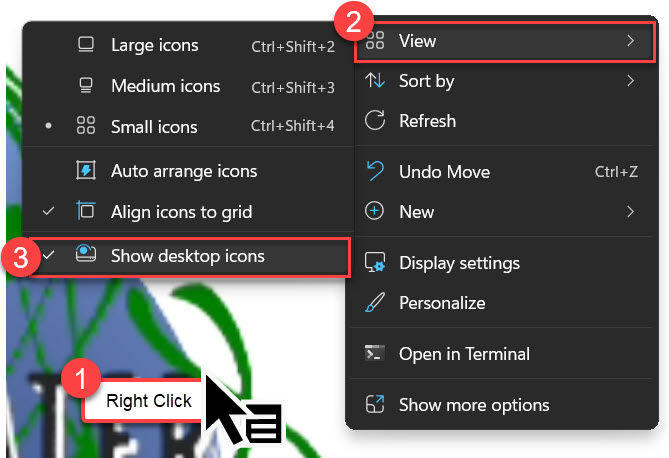
On iPhone:
Touch and hold the app you want to remove.
Tap Remove App.
Select Remove from Home Screen to hide the app without uninstalling it.
On Android:
Touch and hold the application icon.
Drag the icon to the Remove zone or tap the remove option to clear it from your main workspace.
By hiding application shortcuts, you force yourself to use them intentionally instead of just clicking on them reactively when you see an alert badge.
Automate Mindfully
When technologists feel overwhelmed, their first instinct may be to build a script or deploy an AI tool to sort through the noise. However, before you automate, it may be helpful to examine the existing workflow. Otherwise, blindly piping work through AI tools or automated triggers into your environment will simply magnify the chaos.
Results from an ongoing study by BetterUp and Stanford shows that AI has added an hour and 56 minutes of work for downstream users.
These adjustments are just the starting point for a broader shift in how we work.
Shifting Your Mindset
If your technical team or organization is ready to move past superficial productivity hacks and build long-term digital balance, let's connect.
Download the guide from our course "Digital Wellbeing for Technologists."
You can also request a customized Digital Wellbeing course designed to help your team navigate digital overload and protect deep-focus workflows. Just as important as learning is sharing what works.
Share Your Wins:
Which system level tweak has made the biggest difference in your team's daily flow? Drop your wins in the comments section below.


Comments